Why run AI locally · Part 1
Where do your AI chats go, and does a local model keep them private?
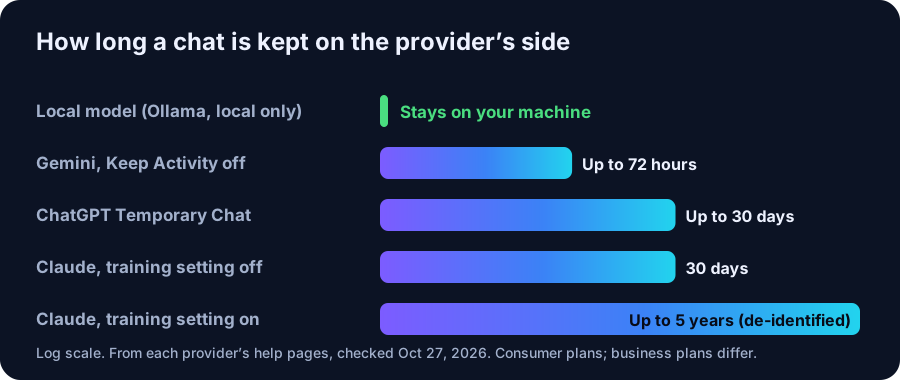
Cloud chatbots keep your chats for 72 hours to 5 years depending on the service and your settings. A local model keeps them on your own computer.
We earn from qualifying purchases via affiliate links. Disclosure.
- ChatGPT Free, Plus and Pro share chats for training by default; you can turn that off (OpenAI).
- Claude keeps chats 30 days with training off, and up to 5 years de-identified with it on (Anthropic).
- With Gemini’s Keep Activity off, chats are kept up to 72 hours (Google).
- Ollama runs models locally, doesn’t see local prompts, and listens only on your own machine by default.
Short answer: a chat with ChatGPT, Claude or Gemini is stored on the company’s servers. How long it stays there depends on the service and your settings, from up to 72 hours to up to 5 years (from their help pages). A model running in Ollama on your own PC processes the chat on your machine, and Ollama says it doesn’t see your prompts. That’s the main privacy argument for local AI. It isn’t automatic, though, so here are the settings that matter.
What the big three say they keep
These are the consumer plans most people use. Business and API plans have different terms.
- ChatGPT: on Free, Plus and Pro, “data sharing is enabled by default”. Turning off Improve the model for everyone stops new chats being used for training, but they stay in your history. Temporary Chats “may be retained for up to 30 days for safety purposes” (OpenAI).
- Claude: since Anthropic’s 2025 terms update you pick a training setting. With it on, data may be kept “in a de-identified format for up to 5 years”; with it off, the 30-day retention period applies. Deleted chats leave back-end storage within 30 days (Anthropic).
- Gemini: with Keep Activity off, chats are kept with your account for up to 72 hours to respond and for safety. Google’s Privacy Hub also says human reviewers may read some chats, and reviewed chats are kept separately for up to 3 years (Google).
None of this means these companies misuse your data. It means your words sit on someone else’s servers, under terms that can change. Anthropic’s 2025 update is an example: existing users had to make a new choice by October 8, 2025.
What happens with a local model
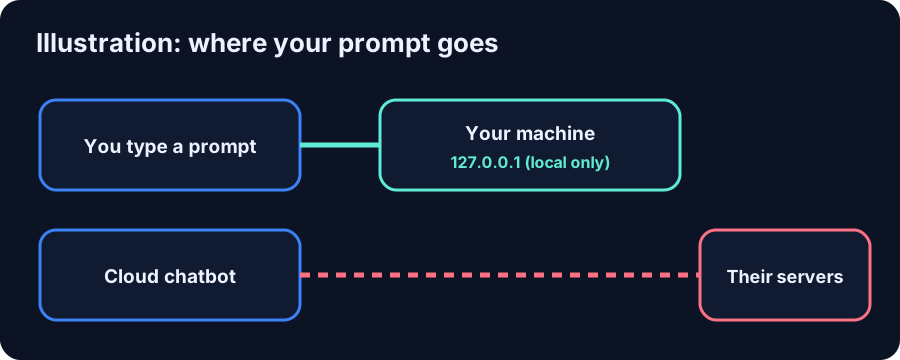
When you run a model with Ollama, the model file sits on your drive and the chat is processed by your own CPU or GPU. Ollama’s FAQ puts it plainly: “Ollama runs locally. We don’t see your prompts or data when you run locally.” Its server listens on 127.0.0.1 by default, so other devices can’t reach it unless you change that. Once a model is downloaded, it runs without an internet connection.
One caveat: Ollama also offers cloud models, and those run on Ollama’s servers. The FAQ documents OLLAMA_NO_CLOUD=1 to turn cloud features off completely.
Make a local setup actually private
- Leave the default binding. Keep Ollama on
127.0.0.1unless you need other devices to reach it, and never expose it to the open internet. - Turn off cloud models with
OLLAMA_NO_CLOUD=1if you never want a prompt to leave the machine. - Watch the extras. A chat front end, plugin or web-search tool can send data out even when the model is local. Check what each one connects to.
- Protect the disk. Chats stored locally are only as private as your PC. Use disk encryption and a login password.
What hardware you need for this
Privacy doesn’t need a big model. Llama 3.1 8B is a 4.9 GB download and runs on an entry GPU or a 32 GB mini PC (see the entry-model guide). For a stronger general model, gpt-oss 20B is 14 GB and fits a 16 GB card (Can the RTX 5060 Ti 16GB run gpt-oss 20B?). To check your own machine, use What fits my memory or the 16 GB tier.
When the cloud is still the better call
Local models are smaller than the best cloud models, so for the hardest questions a cloud service still gives better answers. If you use one, the settings above (training off, temporary or incognito chats) reduce what’s kept. Many people use both: local for private documents and personal notes, cloud for the hard problems.
Hardware in this article
Minisforum NAB6 Lite, Core i5-12600H, 32GB RAM / 500GB SSD
$607 Minisforum · checked Oct 27, 2026, 1:06 PM CT
Listed as available in the store data. Integrated graphics only: models run from system RAM.
Check price at Minisforum (opens in a new tab)
ASUS Dual GeForce RTX 5060 Ti 16GB OC
Price shown at Amazon
Sold at Amazon.
Check price at Amazon (opens in a new tab)FAQ
Does ChatGPT use my chats for training?
On Free, Plus and Pro personal workspaces, OpenAI says data sharing is on by default. Turn off “Improve the model for everyone” in Settings, Data controls to stop new chats being used.
How long does Claude keep my chats?
Anthropic says 30 days with the model-improvement setting off, and up to 5 years in de-identified form with it on. Deleted chats are removed from back-end storage within 30 days.
Is a local AI model completely private?
The model runs on your computer and Ollama says it doesn’t see local prompts. Add-ons such as web search or cloud models can still send data out, so turn those off if you need it fully local.
Do I need an expensive PC for private AI?
No. Llama 3.1 8B is a 4.9 GB download in Ollama and runs on entry hardware; a 32 GB mini PC was $607 in our Oct 27, 2026 price check.